Speed Kit vs Native PPR
Why Speed Kit's decoupled, browser-native approach delivers the instant loading of Next.js Partial Prerendering without the refactoring, cost, and maintenance burden.
Speed Kit vs. Native Next.js Partial Prerendering (PPR)
Key Takeaways
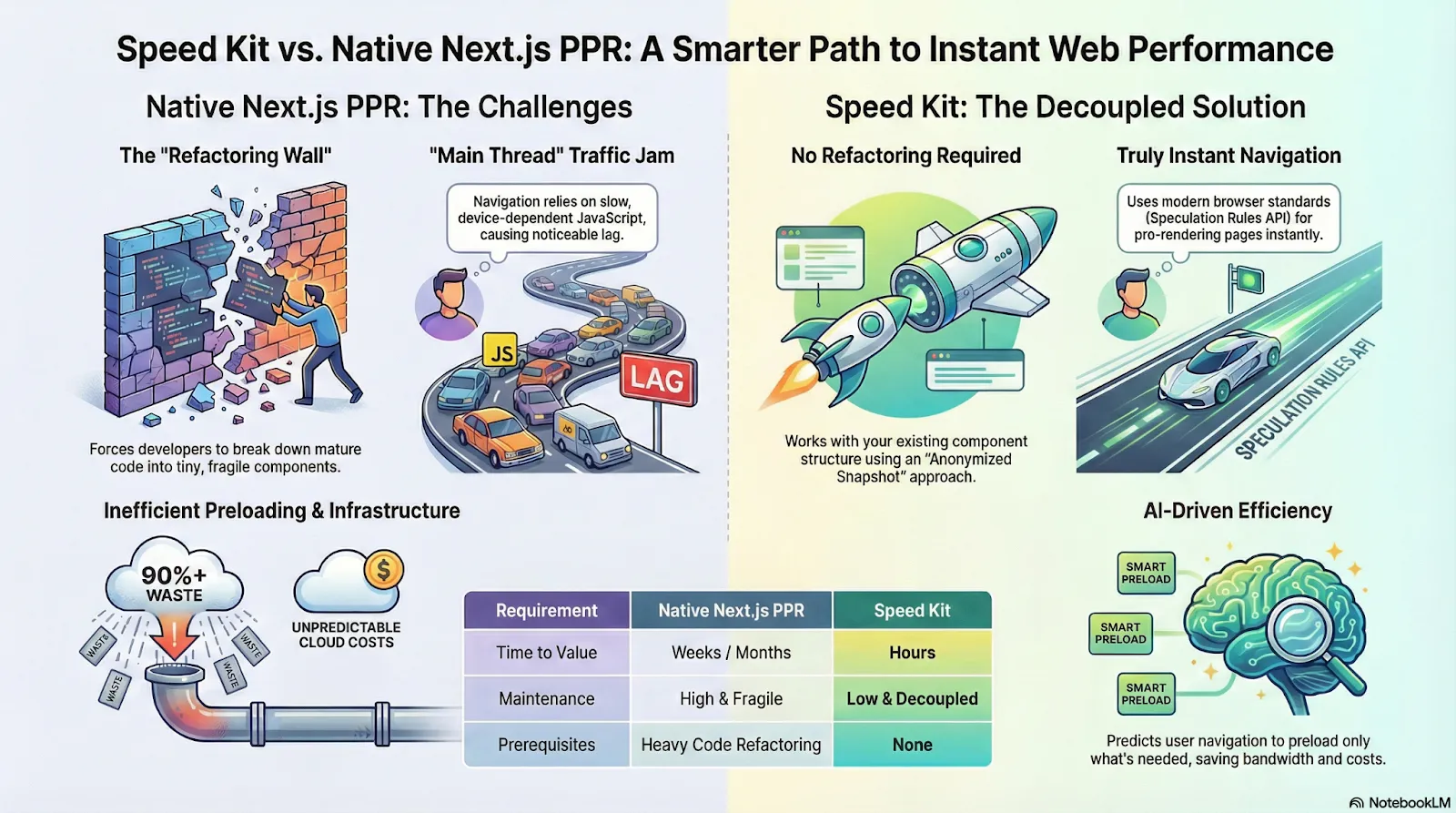
- Decoupled Architecture: Speed Kit delivers instant loading speeds through a browser-based Service Worker and Edge logic, eliminating the need to refactor complex code or "atomize" components as required by Native PPR.
- Superior Navigation Stability: By utilizing the standardized Speculation Rules API, Speed Kit performs instant hard navigations that clear memory and avoid the Main Thread contention, Cumulative Layout Shifts (CLS), and INP regressions common with Next.js client-side routing.
- AI-Driven Efficiency & Offloading: Speed Kit handles predictive preloading completely on its own infrastructure, ensuring no increase in your origin server load or costs. Unlike native solutions where "viewport pre-fetching" spikes cloud bills, Speed Kit uses AI prediction to maximize speed efficiently.
Introduction
In the evolving landscape of web performance, Next.js Partial Prerendering (PPR) promises to merge the benefits of static site generation with dynamic content. However, for established e-commerce architectures, adopting native PPR often presents a significant "Refactoring Wall." It requires decomposing mature codebases into atomic units, introducing substantial technical debt and maintenance overhead.
Speed Kit offers a robust alternative that achieves the intended outcome of PPR—instant page loads with seamless dynamic merging—without the architectural burden. By leveraging Browser Natives (such as the Speculation Rules API) and intelligent Edge Logic, Speed Kit completely decouples performance from your application code. This document outlines why a managed solution like Speed Kit is often the more prudent choice for enterprise e-commerce compared to a native implementation.
Technical Comparison: Navigation Architectures
To understand the performance implications, it is critical to distinguish how Native PPR and Speed Kit handle navigation.
1. Native PPR: The Hybrid Model
Native Next.js employs two completely different mechanisms depending on the user's context.
- Hard Navigation (First Load / Re-entry / Cross-Stack): This occurs when a user arrives from Google, refreshes the page, re-enters the site later, or navigates between different application stacks (e.g., moving from a Next.js PLP to a separate Checkout app or legacy PDP). In these cases, the browser has no shared JavaScript state. Next.js serves a Static HTML Shell immediately from the Edge, then streams the dynamic content (like prices) as it becomes ready. This is fast because the browser renders HTML natively.
- Soft Navigation (Client-Side Routing): Once the page is loaded, Next.js "hydrates" into a Single Page Application (SPA). As users scroll, Next.js automatically pre-fetches the Static RSC Payloads for links in the viewport. When a user clicks, the browser does not reload. Instead, JavaScript intercepts the click, combines the pre-cached static shell with fresh dynamic data, and manually reconstructs the DOM.
2. Speed Kit: The Browser-Native Approach
Speed Kit takes a fundamentally different approach by leveraging the modern Speculation Rules API.
- Instant Hard Navigation: Speed Kit treats every click as a "Hard Navigation," but makes it instant. We instruct the browser to pre-render the next page in a hidden background process. When the user clicks, the browser simply swaps the view.
- Zero Initialization Tax: Because Speed Kit does not rely on a client-side router to construct the page, we do not need to boot up heavy JavaScript logic on the first load. The user gets a fast experience immediately, and the browser handles the transition natively.
- Client-Side Merging: Once the browser swaps to the new page (the Anonymized Snapshot), Speed Kit's Service Worker fetches the fresh dynamic data from your origin and merges it into the DOM.
Performance Implications of Navigation Types
Relying heavily on JavaScript to handle routing is increasingly viewed as an anti-pattern for complex e-commerce sites, particularly regarding interaction stability and rendering performance.
Performance Characteristics of Client-Side Routing (Next.js)
Next.js utilizes a client-side router to intercept clicks and patch the DOM. While the static "shell" may be pre-fetched, the actual navigation process introduces distinct hurdles:
Main Thread Execution Overhead:
Even if the Static Shell is pre-fetched and ready in the cache, it is stored as an RSC Payload (JSON-like data), not HTML. To display this shell, the browser must execute a heavy sequence of JavaScript tasks on the single Main Thread:
- Construct the new Virtual DOM from the payload.
- Diff the Virtual DOM against the current state.
- Patch the actual Real DOM.
- Paint the static shell.
Network Latency and Processing
Simultaneously, the browser must fire a request to the Next.js Edge Server to retrieve the fresh Dynamic Data (RSC Payload). The Edge then fetches the data from your backend and streams it back.
The Impact: The browser must parse the RSC payload for the dynamic data and rerun similar rendering steps (reconciliation, diffing, patching) as it did for the shell before the content becomes actually visible. This relies again heavily on JavaScript, consuming further Main Thread resources even after the data has arrived.
Hardware Dependency
Because this entire sequence relies on the client's CPU, performance fluctuates wildly based on the user's device. On average mobile phones, this processing time creates a noticeable lag (poor Interactive Content Full Paint), even if the data was already downloaded.
Performance Characteristics of Speculation Rules (Speed Kit)
Speed Kit leverages the Speculation Rules API, a modern browser standard, to handle navigation.
- Off-Thread Background Rendering: Speed Kit instructs the browser to fully render the Anonymized Snapshot of the next page in a completely separate process. The browser natively parses HTML, calculates styles, and paints the pixels of this cached view to an off-screen buffer in the background.
- Instant Swap: When the user clicks, the browser simply composites this pre-painted snapshot into view. The user sees a visually complete page instantly.
- Background Hydration: Immediately upon the click, Speed Kit requests the fresh dynamic data (e.g., cart, prices) from the origin and merges it into the page, ensuring data freshness without delaying the visual transition.
Operational Considerations for Single Page Applications (SPAs)
Beyond the theoretical performance costs, relying on Client-Side Routing (Soft Navigation) introduces significant operational headaches for enterprise e-commerce environments.
1. Initial Load Overhead vs. Session Depth
To enable "Soft Navigations," the browser must download and execute a massive amount of JavaScript upfront. This creates a high "Initialization Tax" on the very first load.
Key Insight: As highlighted in The Curious Case of the Shallow Session & SPAs, this trade-off is often negative for e-commerce. The majority of users are "bouncers" or shallow visitors who leave before they ever click a second link. In the Native PPR model, these users pay the high cost of booting up the SPA framework but leave before reaping the benefits of fast soft navigations.
2. Integration with Micro-Frontends
Modern e-commerce sites are rarely monolithic Single Page Applications (SPAs). They are typically a patchwork of distinct systems:
- Discovery: Next.js (Home, PLP, PDP)
- Checkout: Shopify / Salesforce / Different Next.js APP / Legacy (Different Tech Stack)
- Account: Separate Authentication App
The Problem: Client-Side Routing only works within the boundaries of the Next.js app. The moment a user moves from PDP (Next.js) to Checkout (Different Tech Stack), the browser forces a Hard Navigation.
The Waste: The heavy JavaScript bundles downloaded to power the Next.js "Soft Navigation" logic are effectively wasted. The user paid the "Initialization Tax" but never reaped the long-term benefit because the checkout flow breaks the SPA session.
3. Cache Persistence and Reliability
Native PPR relies on the Next.js Router Cache to store pre-fetched fragments.
- The Volatility: This cache is strictly in-memory. If the user hits "Refresh," closes the tab, or navigates to the Checkout and hits "Back," that cache is wiped instantly. The browser must re-fetch the data.
- The Speed Kit Difference: Speed Kit leverages the Service Worker Cache and standardized HTTP Cache, which persist to disk. Pre-rendered snapshots survive reloads, switching between stacks, leaving the page entirely, or even browser restarts. If a user leaves and returns, the content is served instantly from the device's storage, not re-fetched from the network.
4. Measurement and Analytics Discrepancies
For years, soft navigations have broken how browsers and analytics tools measure performance, creating a significant liability for Single Page Applications (SPAs).
- The CrUX Ranking Penalty: Historically, Google's Chrome User Experience Report (CrUX) effectively ignored soft navigations, recording only the initial "Hard Load"—typically the slowest part of a session. As a result, SPAs have appeared significantly slower in Google's ranking data than they feel to users, causing an invisible "Reporting Penalty" that has negatively impacted SEO for years.
- Third-Party Chaos: Beyond Google, the broader marketing ecosystem remains broken. Pixels, Chatbots, and GTM scripts often expect a clean page load. In an SPA, they frequently misfire (missing data) or duplicate events, leading to unreliable attribution and broken ad spend tracking.
5. Memory Management and Long-Running Sessions
In a Soft Navigation architecture, the browser window never truly refreshes. It keeps the same JavaScript environment alive for the entire session.
- The Risk: Every tracking script, carousel listener, and AB testing tool adds memory overhead. Over a long shopping session, these "Memory Leaks" accumulate, causing the site to become sluggish, unresponsive, or even crash on low-end mobile devices.
- The Native Remedy: Hard Navigations inherently trigger a browser-level garbage collection on every page view. Because Speed Kit performs an instant hard navigation for every click, the memory is wiped clean automatically. This ensures the 10th page click feels just as snappy as the first, without the complexity of manual memory management.
Implementation Requirements and Code Architecture
The primary obstacle to adopting Native PPR is not the configuration of the framework, but the architectural standards required to make it effective.
Component Granularity Requirements
To get the best out of Native PPR, your application requires a highly granular, "Atomic" component structure. The framework relies on strict isolation between static content (which can be cached) and dynamic interactivity (which must stream).
The Challenge of Cohesive Components
Mature React applications often rely on cohesive "God Components" where layout, business logic, and data fetching are tightly coupled for convenience.
- Example: Consider a standard Price Card that displays a static product image and title alongside dynamic price and real-time stock availability.
- The Constraint: In a cohesive component, if even one variable (like stock status) is dynamic, Next.js effectively treats the entire component as dynamic. This forces the framework to opt out of pre-rendering for the image and title as well, resulting in a "Skeleton Screen" experience where the user sees nothing but gray boxes until the data arrives.
Refactoring Necessity
To unlock the performance benefits of PPR, you must refactor these cohesive units. Developers need to surgically extract every piece of dynamic logic into its own isolated component (e.g., <StockIndicator />) and wrap it in <Suspense>. Only then can the surrounding layout be statically pre-rendered.
Ongoing Maintenance Considerations
Even after a successful refactor, Native PPR remains operationally expensive.
Static Opt-Out Risks
A minor change—such as a developer adding a dynamic dependency like cookies() to a previously static component—can silently cause that component to opt out of static rendering. This leads to performance regressions that are difficult to detect and resolve.
Cache Invalidation
If you succeed in isolating the static parts (e.g., the Product Image), you assume a new responsibility: Purging.
- The Scenario: When a merchandiser updates a product image in your PIM, that static fragment remains stale in the Next.js Edge cache.
- The Burden: You must engineer a complex infrastructure of Webhooks and Revalidation Tags (revalidateTag) to instantly purge specific cache keys whenever underlying data changes. Failure to maintain this pipeline results in customers seeing outdated content while the backend shows the new data.
HTML Streaming Race Conditions
Because PPR depends on streaming responses, race conditions can occur where the body content is sent before the metadata (Head). This "HTML Drift" results in invalid page structures where <title> or <meta> tags appear inside the <body>. Browsers may still render the page, but SEO bots and performance metrics often break silently, creating hidden liabilities.
Speed Kit Approach: Snapshot Architecture
Speed Kit circumvents these issues by decoupling performance from your code architecture:
- No Refactoring Required: Speed Kit works with your existing component structure.
- Snapshot Caching: We cache an anonymized HTML version of your site—essentially the same view a Search Bot receives. Unlike the skeleton state of a partial PPR page, the user sees a page that appears visually more complete and feels ready instantly.
- Dynamic Merging: Speed Kit merges user-specific data (such as cart contents or pricing) in the rendered DOM.
- Crowd-based Change Detection: Speed Kit compares the dynamic content served to real users against the cached snapshot in the background. When a threshold of users receives updated data (like a price change or a new headline), Speed Kit automatically invalidates the old snapshot and generates a new one. This ensures your cache stays synchronized with your backend without manual intervention or complex webhook setups.
This approach delivers the performance benefits of a static site instantly, without the need for refactoring anything.
Comparison: Implementation & Maintenance
| Requirement | Native Next.js PPR | Speed Kit |
|---|---|---|
| Prerequisites | Heavy Refactoring: Must break components into atomic static/dynamic parts. | None: Works with existing component structure. |
| Dynamic Handling | Manual: Developers must wrap every dynamic source in <Suspense> and manage fallbacks. | Automated: Speed Kit automatically identifies and handles dynamic content merging. |
| Time to Value | Weeks/Months: Dependent on clearing technical debt. | Hours: Requires only Service Worker installation. |
| Maintenance | High: Strict adherence to separation rules required for every new feature. | Low: Decoupled from feature development. |
Infrastructure Costs and Efficiency
Performance strategies must also consider infrastructure costs and efficiency.
1. Compute Usage vs. Static Delivery
The defining feature of Native PPR is that it merges static shells with dynamic holes. This architecture fundamentally changes your hosting economics.
- The Cost: You can no longer serve your pages from a standard, low-cost CDN (Content Delivery Network). Every single Hard Navigation requires an active Edge Compute instance to execute the logic that stitches the static and dynamic parts together.
- The Impact: You pay for CPU cycles and execution time for every page view. Compared to serving static assets, this "Compute Tax" significantly inflates your monthly cloud bill, especially during high-traffic events like Black Friday where compute scales linearly with traffic.
2. Preloading Strategies and Resource Usage
Native implementations typically force a hard choice between two flawed preloading strategies:
Viewport Pre-Fetching
Data is fetched for every link that appears on the screen.
The Flaw: Over 90% of these requests go unused. This creates unpredictable spikes in edge compute and bandwidth bills.
Hover Pre-Fetching
Alternative configurations wait until the user hovers over a link to begin fetching.
The Flaw: While this saves bandwidth, the "headstart"—the milliseconds between hover and click—is often insufficient to render a heavy e-commerce page.
The Dilemma
You are stuck choosing between massive infrastructure waste or an ineffective performance optimization.
3. Predictive Loading and CDN Offloading (Speed Kit)
Speed Kit replaces this dilemma with a precision-based approach.
- AI-Based Prediction: Speed Kit uses Probabilistic Prediction based on Real User Monitoring (RUM) data. We identify high-probability navigations before the hover event, providing a sufficient headstart for instant loading without the waste of viewport fetching.
- Client-Side Native Merging: Speed Kit serves the anonymous HTML snapshot immediately from the Edge. It then fetches the fresh response from your origin server and merges the two. This merging happens on the main thread but utilizes the browser's native capabilities to efficiently merge the two natively parsed DOM trees. This avoids heavy JavaScript execution and eliminates the need for a synchronized "Resume" step between Edge and Region.
- Compression Dictionaries: Speed Kit employs advanced delta-compression. By using the current page as a dictionary for the next, HTML payloads are reduced by up to 90%.
Managed Services and Performance Monitoring
While native frameworks provide tools, they do not provide accountability. Speed Kit differs by offering a fully managed service layer that sits on top of your infrastructure.
- Enterprise-Grade Monitoring: Speed Kit includes built-in, enterprise-grade Real User Monitoring (RUM). Unlike standard SaaS tools where you are left to interpret charts, our team of performance experts actively monitors your Core Web Vitals and business KPIs.
- Shared Responsibility: We take ownership of your performance. Speed Kit is more than software; it is a partnership. If anomalies arise, our engineers intervene proactively to ensure stability, freeing your DevOps team to focus on feature development rather than firefighting.
- Future-Proofing via Community Leadership: Through close collaboration with browser vendors and the international web performance community, we ensure your infrastructure is always aligned with the latest browser capabilities—guaranteeing you access to state-of-the-art solutions like the Speculation Rules API before they become mainstream.
Summary
Native Partial Prerendering relies on the Single Page Application (SPA) architecture, a pattern that has proven increasingly problematic for e-commerce sites—whether legacy or greenfield. The operational complexity, memory leaks, and browser contention inherent to SPAs create a fragile foundation for online stores.
Speed Kit allows you to bypass these architectural pitfalls entirely. By treating performance as an infrastructure layer rather than a code concern, Speed Kit delivers the instant speed of PPR immediately, using modern browser standards to guarantee performance that survives your next code deployment.